Digital aircraft logbook: every aircraft, one file.
Log a flight once. AVIOFILE updates the aircraft logbook, your pilot logbook, the aircraft hours and the maintenance deadlines for you. One shared history for pilots, owners, co-ownership groups, flying clubs and flight schools.
Made for general aviation and ULM. Your data is stored in the EU.

Everything an aircraft needs, in one place
Features that share the same data, so nobody types the same thing twice.
Aircraft profile
The complete digital history of each aircraft: hours, flights, components, avionics, documents and costs. It belongs to the aircraft, so it stays with it when the aircraft changes hands.
- Hobbs and tach counters updated by every flight
- Components with time since new and since overhaul
- A change history: who changed what, and when

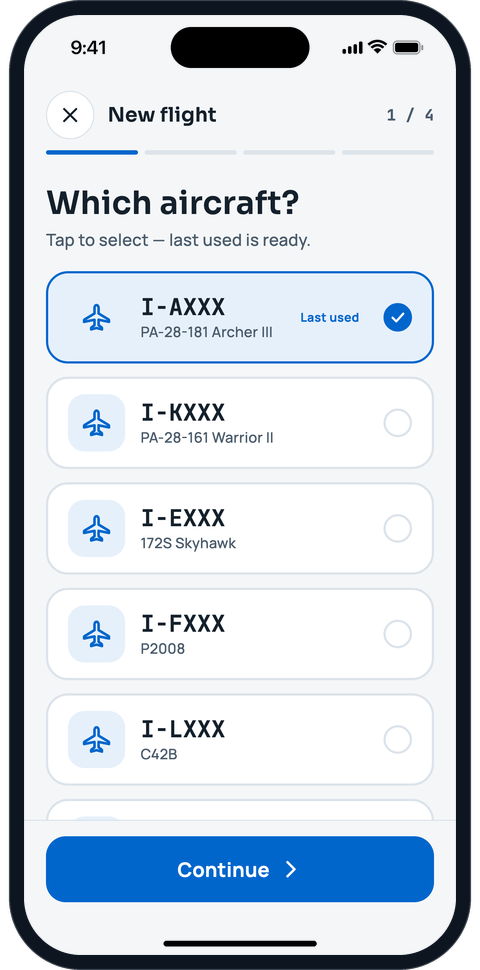
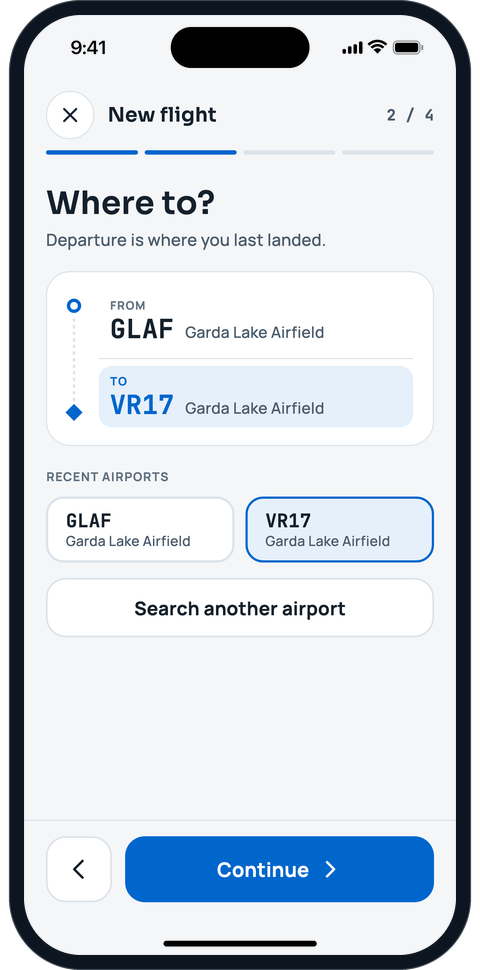
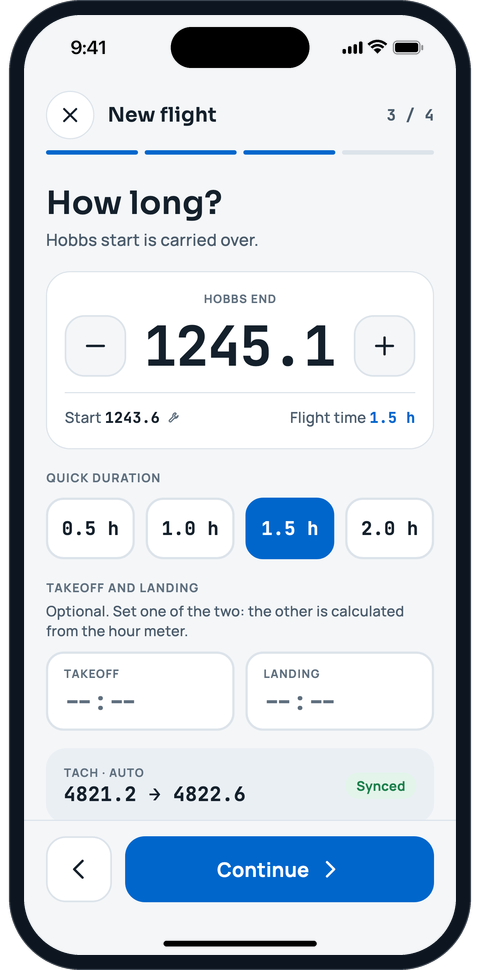
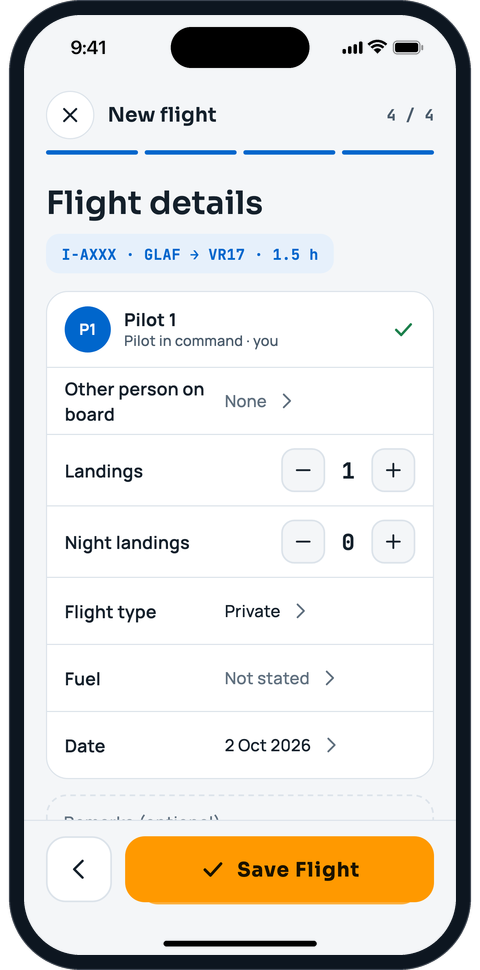
Logbook and new flight in four steps
Pick the aircraft, the arrival and the duration, then save. Hobbs and tach carry over from the last flight and the pilot is pre-filled. The aircraft logbook, the pilot logbook, the hours and the deadlines all update from that single entry.
- Pilot logbook with totals and carry-overs, including external and simulator flights
- Currency, licence and medical expiry in one view
- Export your logbook to CSV or to PDF in the EASA or FAA format whenever you want


Maintenance and deadlines
Deadlines by hours or by calendar, whichever comes first. Follow inspections, work in progress and defects, and see at a glance which deadlines are approaching or have passed.
- Deadlines by hours, by calendar or both
- Squawks (defect reports): a grounding squawk blocks the aircraft
- Interventions: upcoming, in progress and completed

Flight schools and training
Fleet status, students, instructors and today’s flights on one dashboard, with the training progress of each student.
- Fleet and flights of the day at a glance
- Courses with syllabus, enrolments and signed lesson records (Training module)
- School dashboard and reports (Training module)
- Members’ flight credit: top-ups recorded by the office, and receipts
Learn more: Flight schools and training

-
Import, export and calendar
Switching from another app? Bring your pilot logbook with you. Export it as a PDF in the EASA or FAA format, and see your bookings and lessons in the calendar you already use.
-
Classroom
Create student groups like “PPL 2027” (a student can be in several), schedule ground lessons, briefings, exams and simulator sessions for them in one calendar and share slides, manuals and notes. Students see their own lessons and material; instructors take attendance in a few taps.
-
Documents with expiry dates
Certificates, insurance, registration papers and licences in one place, each with an expiry date you can see before it matters.
-
Notifications
Reminders for upcoming deadlines, expiring documents and changes that need your attention, in the app and by email.
Made for everyone who shares the same aircraft
Pilots
A logbook with totals, currency and expiry dates that follows you from aircraft to aircraft.
Pilot logbookOwners
The full story of your aircraft: hours, components, maintenance, documents and costs.
Aircraft maintenanceCo-ownership groups
Shares, bookings, flying shifts and a clear balance between co-owners.
Co-ownership and flying groupsFlying clubs
Fleet, members, bookings and deadlines in one shared calendar.
Flying clubs and flight schoolsFlight schools
Students and groups, lesson calendar, teaching material, flights of the day and training progress in one place.
Flying clubs and flight schools
Your records, protected and portable
A logbook is personal and an aircraft file is valuable. AVIOFILE is built to protect both, and to let you leave with your data whenever you want.
Hosted in the EU
Data is stored in Frankfurt, Germany.
Encrypted
Encrypted in transit and at rest, with access controlled by role.
Yours to take away
Export your personal data as a ZIP file and delete your account whenever you decide.
No tracking
No advertising, no analytics cookies and no third-party trackers on this website.
Frequently asked questions
What is AVIOFILE?
AVIOFILE is a digital platform for general aviation and ULM: aircraft profile, pilot and aircraft logbooks, maintenance, bookings, shared ownership, costs, documents and flight schools. A flight is entered once and updates everything that depends on it.
Who is it for?
Pilots, owners, co-ownership groups, flying clubs and flight schools. Each person and organisation has its own space, and an aircraft can be shared between them.
Where is my data stored?
In the European Union, in Frankfurt. Data is encrypted in transit and at rest.
Can I export my data?
Yes, at any time. In the app, open Menu > Privacy & information > Export my data and you get a ZIP file with your personal data: profile, consents, licences, organisations, logbook (also as CSV), bookings and notifications. You can also export your pilot logbook as a PDF in the EASA or FAA format.
How do I invite a co-owner, a student or a member?
Organisation administrators send an invitation by email from the web app. The link opens AVIOFILE in the app, or lets you continue on the web if you do not have the app yet.